Our Blog
Solutions. Made Simple.

Blogging straight to Outlook Inbox


You know that sinking feeling when you stumble across a great blog and realise that it is yet another website that you have to return to on a regular basis. Or you are going to have to finally bite the bullet and start using some kind of console app that monitors these things for you? Well, I’ve been successfully resisting the temptation to do either of these things for years, but just recently I’ve become hooked on a few great blogs and have been disappointed to find that they don’t routinely have a “notify me” feature to tell you when there has been a new posting.

All is not lost! Those friendly folks at Microsoft (you know, the spawn of the devil and all that) have been sneaking useful features into Outlook for years, and there’s one in there that lets you monitor an RSS feed. RSS is a data format that is shared by just about every blog on the planet. By using this we can tell Outlook where to look, and it will do the donkey work of keep track of the blog for you. It always feels good knowing that Bill Gates and Co. are doing your donkey work.

To start just find the link to the RSS feed from the blog itself. This is usually easy to spot as a button somewhere on the page. If for some reason the blog owners have chosen not to publicise this (maybe like here at SteamDesk they have decided that they wanted to de-clutter the page a bit) you can still usually get to it by making an educated guess as to how to change the URL. Here’s our blog URL, that’s the web page address in the bar at the top of the page:

The URL is the line at the top that reads www.steamdesk.com/blog

The URL is the line at the top that reads www.steamdesk.com/blog

In our case you just put “/feed” at the end of the URL and hit go. In many other blogs you add one of “?feed=rss” or “?rss=true”… Anyway, once you get the RSS link right your browser will show you things in a very different way, a standard format XML feed. Here’s how Chrome does it:
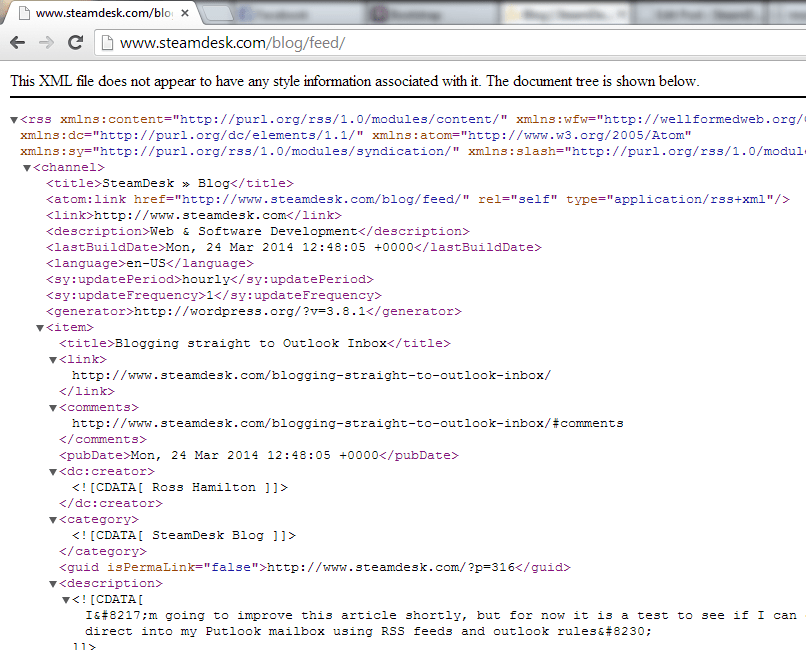
Chrome showing an RSS feed

Chrome showing an RSS feed

Here’s how Internet Explorer does it:
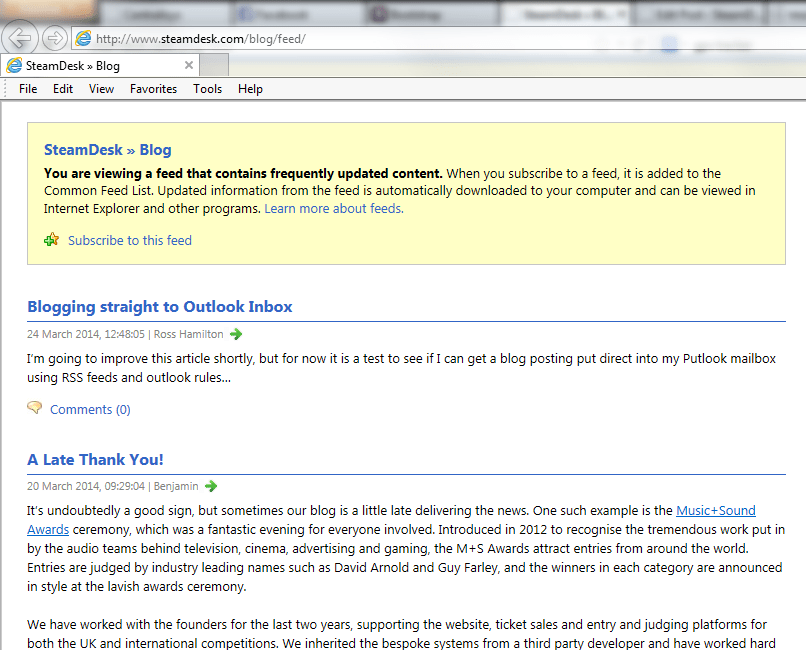
RSS in Internet Explorer

RSS in Internet Explorer

And here it is in Firefox – the Firefox presentation is nicest, I’ll show you why shortly:
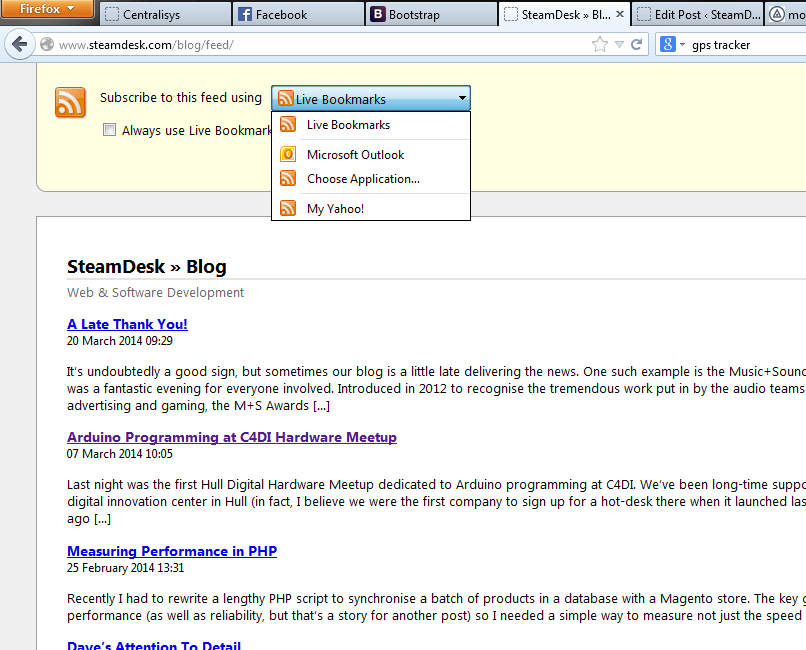
RSS feed in Firefox

RSS feed in Firefox

As you can see, Firefox (and IE) also gives you the direct ability to subscribe to the feed. I think that this is implemented nicest in FF. The option you want to choose is Microsoft Outlook (did I mention that I love Outlook? I’ve tried Thunderbird, etc. and none of them come close, in my opinion). This creates a new item in the RSS Feeds section of your Outlook mailbox:

RSS Feed Added to Outlook

RSS Feed Added to Outlook

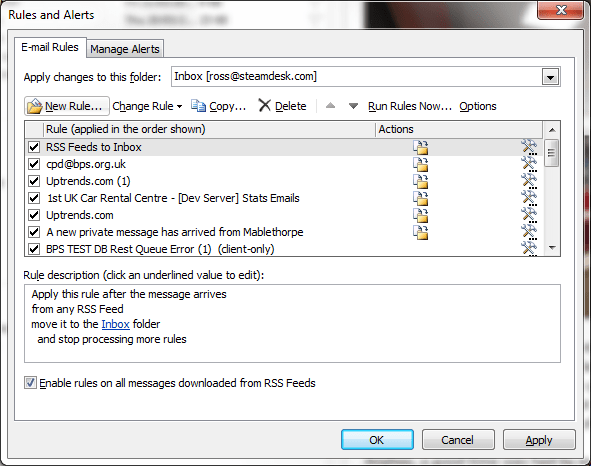
Now, you could just stop at this point, this is already pretty cool, but why not go a step further and ensure that the blog posts actually come direct into your main inbox? It’s a simple case of setting up your Outlook rules, and this sequence of pictures shows you how:

Go to "Manage Rules and Alerts"

Go to “Manage Rules and Alerts”

Start by clicking on "New Rule"

Start by clicking on “New Rule”

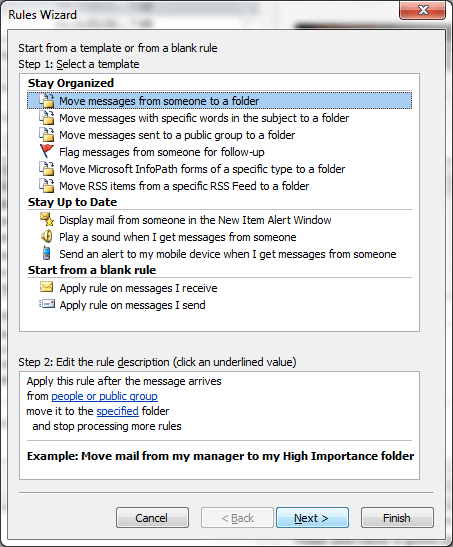
Leave it on "Move messages from someone to a folder" and just hit Next

Leave it on “Move messages from someone to a folder” and just hit Next
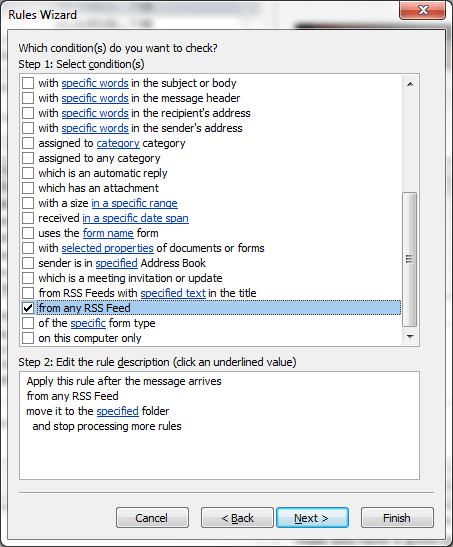
Scroll down to new the bottom and choose "from any RSS Feed"

Scroll down to new the bottom and choose “from any RSS Feed”
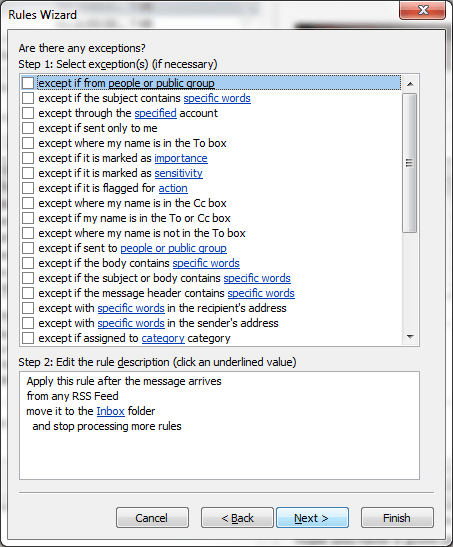
You might want to make some exceptions here (I didn't)

You might want to make some exceptions here (I didn’t)
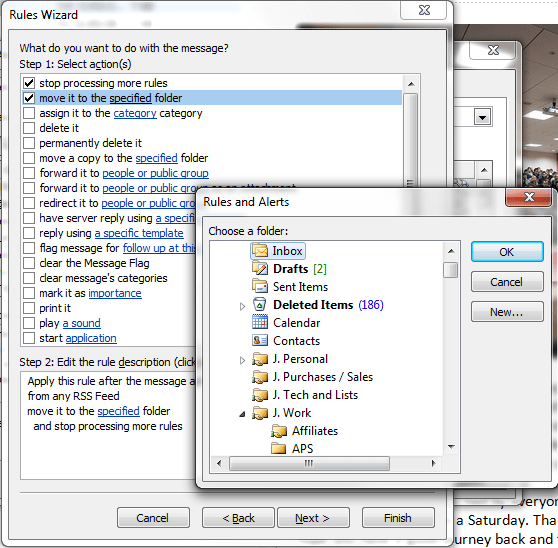
Chose your inbox as the destination for the messages to go

Chose your inbox as the destination for the messages to go

Give it a name - we've made a general purpose rule here, so I left it as "RSS Rule" but I might want specific rules for different blogs.  Outlook rules are very flexible.

Give it a name – we’ve made a general purpose rule here, so I left it as “RSS Rule” but I might want specific rules for different blogs. Outlook rules are very flexible.

There you go, a monitored blog and an Outlook rule that pushes new posts to the blog straight into the top of your inbox. Use sparingly, because if you forget you did it and find that you have signed yourself up for a busy blog you might think you’re being spammed, and there’s nothing more dopey than someone trying to complain about spam that they’ve signed themselves up to… I wouldn’t like to guess how many times I’ve seen someone post “please remove me from your list” to an opt-in mailing list!

The only other thing worth mentioning is that this is not a “push notification” – Outlook will check back for any updates as frequently as the site suggests. By default with WordPress this is once per hour. In the old days people might warn against doing this because it would keep your network connection active. Nowadays, with 24/7 network and unmetered usage being pretty ubiquitous, and with the size of these data packets being pretty negligible, I’d say knock yourselves out. You can even increase the frequency if you want, you just need to hunt around in Outlook and untick the box that restricts you to the site owners’ suggestion.

A Late Thank You!


It’s undoubtedly a good sign, but sometimes our blog is a little late delivering the news. One such example is the Music+Sound Awards ceremony, which was a fantastic evening for everyone involved. Introduced in 2012 to recognise the tremendous work put in by the audio teams behind television, cinema, advertising and gaming, the M+S Awards attract entries from around the world. Entries are judged by industry leading names such as David Arnold and Guy Farley, and the winners in each category are announced in style at the lavish awards ceremony.

We have worked with the founders for the last two years, supporting the website, ticket sales and entry and judging platforms for both the UK and international competitions. We inherited the bespoke systems from a third party developer and have worked hard to bring them up to our high standards in code quality, performance and reliability.

This has involved the basics, such as importing the codebase to a version control system (our preferred platform is Subversion) and more complex tasks such as merging the UK and international entry platforms so they share the same frontend and backend templates. This has improved efficiency for both entrants and managers, not to mention us as developers, which in turn has lead to great cost savings; rather than doing the work twice whenever a change was required, we now have just one template to change.

I was lucky enough to be invited back to ceremony this year, and attended in late February with my wonderful fiancée Becky. We enjoyed hilarious presenting from Rob Deering, a coconut shy and shooting gallery, freshly made pizzas, deck chairs, beanbags, live music from the explosive The Family Rain and banging DJ, David Holmes. Oh, and a few beverages from the bar too!

My thanks to Nick and Dan, the founders of the awards, for a brilliant night! Same time next year? 😉

2014-02-27 19.43.02

2014-02-27 19.42.58

2014-02-27 19.33.32

2014-02-27 19.56.02

2014-02-27 20.34.22

2014-02-27 19.22.01

*Apologies for the poor quality photos but I’m waiting for the iPhone 6 before upgrading my perfectly good 4!

If you’d like to learn more about how we can help with your existing system, from basic upgrades to complete rewrites and overhauls, check out our services and get in touch.

Arduino Programming at C4DI Hardware Meetup


Programming with Arduino - Basics first, make the LEDs flash

Programming with Arduino – Basics first, make the LEDs flash

Last night was the first Hull Digital Hardware Meetup dedicated to Arduino programming at C4DI. We’ve been long-time supporters of C4DI, which is a digital innovation center in Hull (in fact, I believe we were the first company to sign up for a hot-desk there when it launched last year). A couple of months ago the fledgling Hardware Meetup group was started, and one of the C4DI regulars, Hull University lecturer Rob Miles offered to host a course of learning to program on Arduino hardware. I stepped up and offered for SteamDesk to sponsor some SparkFun hardware kits, so we bought 10 from HobbyTronics, and the kind folks there also gave us some other odds an ends to play with. More about them in future blogs…

I took my eldest son, William (10) along, and we had a great night, with lots of LEDs flashing, buzzers buzzing, and heads being scratched as we worked through some excellent handouts provided by Rob and generally had fun seeing what we could achieve. I have to admit to cheating a bit, I already know my way around Arduino fairly well and we spent a bit of time last week playing with the gear so Rob has laid down a challenge to go away and make something cool. William and I are going to try to make some kind of a game, I think (we also snaffled one of the displays/button boards that Hobbytronics kindly gave us, so the opportunities for user interaction are a bit better than in the standard SparkFun kit…

Really looking forward to the next one!

Measuring Performance in PHP


Recently I had to rewrite a lengthy PHP script to synchronise a batch of products in a database with a Magento store. The key goal was to improve performance (as well as reliability, but that’s a story for another post) so I needed a simple way to measure not just the speed of the script but the speed of the individual functions of the import process.

After a quick hunt around for something suitable, and being bombarded with nothing but adverts and forced registrations, I decided to spend a few minutes knocking up the following script to fit exactly my requirements. Hopefully this is useful for someone else, feel free to borrow/steal/hack as you see fit!

<?
class Timing
{
	private $Start = 0;
	private $End = 0;

	private $Checkpoints = array();
	private $CheckpointMarker = 0;

	function Timing()
	{
		$this->StartTimer();
	}
	function GetTime()
	{
		return microtime(true);
	}

	function StartTimer()
	{
		$this->Start = $this->GetTime();
	}
	function StopTimer()
	{
		$this->End = $this->GetTime();
	}

	/* resets the marker for checkpoint timing */
	function StartCheckpoint()
	{
		$this->CheckpointMarker = $this->GetTime();
	}
	/* commits a checkpoint to the array, using the marker to work out the elapsed time */
	function AddCheckpoint($name)
	{
		$this->Checkpoints[] = array('name'=>$name,'since_last'=>$this->GetCheckpointElapsed(),'elapsed'=>$this->GetElapsed());
	}
	function GetCheckpointElapsed()
	{
		return ($this->GetTime() - $this->CheckpointMarker);
	}

	function GetElapsed()
	{
		return ($this->GetTime() - $this->Start);
	}

	/* returns an HTML table with the start/end times, and any checkpoints */
	function GetCheckpointsText($echo=true)
	{
		$this->StopTimer();

		$retStr = '<table style="font-size:11px; line-height:13px; border:1px solid #4d4d4d;">';
		$retStr .= '<tr><th style="text-align:left;">Checkpoint</th><th style="text-align:left;">Processing Time</th><th style="text-align:left;">Total Elapsed</th></tr>';

		$retStr .= '<tr><td>Started script</td><td>-</td><td>0</td></tr>';

		foreach($this->Checkpoints as $_checkpoint)
		{
			$retStr .= '<tr><td>'.$_checkpoint['name'].'</td><td>'.$_checkpoint['since_last'].'</td><td>'.$_checkpoint['elapsed'].'</td></tr>';
		}

		$retStr .= '<tr><td>Ended script</td><td>-</td><td>'.$this->GetElapsed().'</td></tr>';

		$retStr .= '</table>';

		if($echo)
			echo $retStr;
		else
			return $retStr;
	}
}

As you can see, it’s basic but does the job and doesn’t leave the original code cluttered with debugging lines.

So how do we use it? Easy! Take a look at the example below and all your questions should be answered.

StartCheckpoint();

SomeDifficultTask();

$Timing->AddCheckpoint('Running the SomeDifficultTask function');

// when we're done we can print out the
// timing table or retrieve it as a string
// if required
$Timing->GetCheckpointsText();

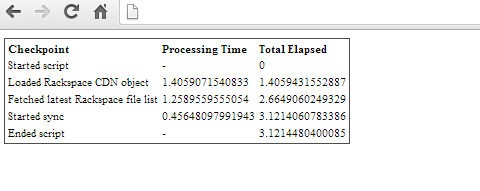
And with that little bit of code you’ll be left with something like the following. I’ve added a few more checkpoints to show this off, but it will work with 0-1000 checkpoints, as you like. Obviously there is some overhead from using this script, but that would really only matter in the most extreme circumstances.

TimingClassExample

Dave’s Attention To Detail


Perfect Cat5e cabling!Dave gets this week’s “attention to detail” award, for making a 20cm long patch cable to go between two switches in our server rack, but still putting number tags on both ends of the cable so we won’t get confused about where it goes 🙂

Seriously though, we do encourage this level of quality control in all aspects of our work, so well done Dave!

Raspberry Pi First Impressions


We took delivery of a Raspberry Pi today, for which kudos goes to CPC for not only a good price (no postage either) but also fast delivery (we only ordered it yesterday lunchtime). It’s great UK-based suppliers like this one that set the standard for customer service, and while we’re all in favour of getting a great price from an overseas supplier from time to time, everyone should buy locally as often as we can or the UK economy may never recover.

Raspberry Pi and Wireless KeyboardAnyway, first impressions. Nicely packaged, the case is reasonable but not “special” (I bought a set with a case and power supply included). We also bought from CPC an ULTRA MINI KEYBOARD AND PAD (their code: CS23874) which turned out to be much smaller than expected, and worked immediately which was a lovely surprise (we had had assumed that we would need to install an OS onto the Pi first, but from the NOOBS boot screen the wireless keyboard/trackpad was working perfectly). NOOBS took a fairly long to do its job, but 30-45 minutes or so later we were able to boot into either of the new operating systems. We installed Raspbian and Raspbmc (probably overkill, presumably if you shell out of Raspbmc you’re essentially in Raspbian?) We booted into Raspbmc for some quick eye-candy and were impressed with what we found.

Then went to try out AirPlay with one of our Apple devices, only to remember that we’d gone elsewhere for a WiFi USB stick (the CPC price didn’t look great for this item, we halved it by going to eBay). Hopefully it will turn up tomorrow and we’ll find time for another play!