
Recently I had to rewrite a lengthy PHP script to synchronise a batch of products in a database with a Magento store. The key goal was to improve performance (as well as reliability, but that’s a story for another post) so I needed a simple way to measure not just the speed of the script but the speed of the individual functions of the import process.
After a quick hunt around for something suitable, and being bombarded with nothing but adverts and forced registrations, I decided to spend a few minutes knocking up the following script to fit exactly my requirements. Hopefully this is useful for someone else, feel free to borrow/steal/hack as you see fit!
<?
class Timing
{
	private $Start = 0;
	private $End = 0;

	private $Checkpoints = array();
	private $CheckpointMarker = 0;

	function Timing()
	{
		$this->StartTimer();
	}
	function GetTime()
	{
		return microtime(true);
	}

	function StartTimer()
	{
		$this->Start = $this->GetTime();
	}
	function StopTimer()
	{
		$this->End = $this->GetTime();
	}

	/* resets the marker for checkpoint timing */
	function StartCheckpoint()
	{
		$this->CheckpointMarker = $this->GetTime();
	}
	/* commits a checkpoint to the array, using the marker to work out the elapsed time */
	function AddCheckpoint($name)
	{
		$this->Checkpoints[] = array('name'=>$name,'since_last'=>$this->GetCheckpointElapsed(),'elapsed'=>$this->GetElapsed());
	}
	function GetCheckpointElapsed()
	{
		return ($this->GetTime() - $this->CheckpointMarker);
	}

	function GetElapsed()
	{
		return ($this->GetTime() - $this->Start);
	}

	/* returns an HTML table with the start/end times, and any checkpoints */
	function GetCheckpointsText($echo=true)
	{
		$this->StopTimer();

		$retStr = '<table style="font-size:11px; line-height:13px; border:1px solid #4d4d4d;">';
		$retStr .= '<tr><th style="text-align:left;">Checkpoint</th><th style="text-align:left;">Processing Time</th><th style="text-align:left;">Total Elapsed</th></tr>';

		$retStr .= '<tr><td>Started script</td><td>-</td><td>0</td></tr>';

		foreach($this->Checkpoints as $_checkpoint)
		{
			$retStr .= '<tr><td>'.$_checkpoint['name'].'</td><td>'.$_checkpoint['since_last'].'</td><td>'.$_checkpoint['elapsed'].'</td></tr>';
		}

		$retStr .= '<tr><td>Ended script</td><td>-</td><td>'.$this->GetElapsed().'</td></tr>';

		$retStr .= '</table>';

		if($echo)
			echo $retStr;
		else
			return $retStr;
	}
}
As you can see, it’s basic but does the job and doesn’t leave the original code cluttered with debugging lines.
So how do we use it? Easy! Take a look at the example below and all your questions should be answered.
StartCheckpoint();

SomeDifficultTask();

$Timing->AddCheckpoint('Running the SomeDifficultTask function');

// when we're done we can print out the
// timing table or retrieve it as a string
// if required
$Timing->GetCheckpointsText();
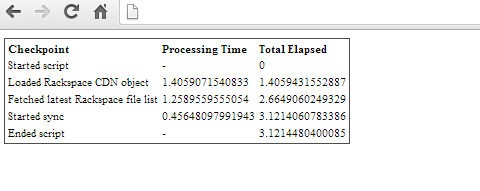
And with that little bit of code you’ll be left with something like the following. I’ve added a few more checkpoints to show this off, but it will work with 0-1000 checkpoints, as you like. Obviously there is some overhead from using this script, but that would really only matter in the most extreme circumstances.
You must be logged in to post a comment.